
The Journey · Chapter 6 of 6 · 45 min
Sovereignty
Run your own node. Use multisig. Lock down your op-sec. Graduation: you don't ask anyone for permission to use Bitcoin.
Where you're going: Your own Bitcoin node, validating every transaction. A multisig wallet that protects against single-point-of-failure. An op-sec posture that lets you hold Bitcoin without becoming a target. This is the graduation chapter. By the end of it, you will not need anyone's permission to use Bitcoin.
1. The Graduation
This is the graduation chapter. The one that turns Bitcoin from "I own some" into "I am a participant."
Up to this point, even with self-custody, you've been consuming Bitcoin - relying on someone else's node for transaction data, someone else's hardware for signing, someone else's recommendation for security. That's fine. Most people stop there forever. The system works for them.
This chapter is for people who don't want to stop there. By the end you will:
- Run your own Bitcoin node, validating every rule of the system from scratch
- Use a multisig wallet that makes single-key compromise non-fatal
- Have an op-sec posture that protects you without being paranoid
- Have a plan for what happens to your coins after you're gone
Pick what's useful. Skip what isn't. The point is sovereignty, not a checklist.
2. Why Run Your Own Node
You can use Bitcoin without running a node. You're using Bitcoin right now without running one, if you're holding from chapter 4. So why?
Verification. Bitcoin's claim - "you don't have to trust anyone" - is only true if you verify. A wallet that connects to someone else's server is trusting that server to tell the truth about your balance and the chain's state. The third party probably tells the truth. But probably is not the same as definitely. Your own node tells you definitely.
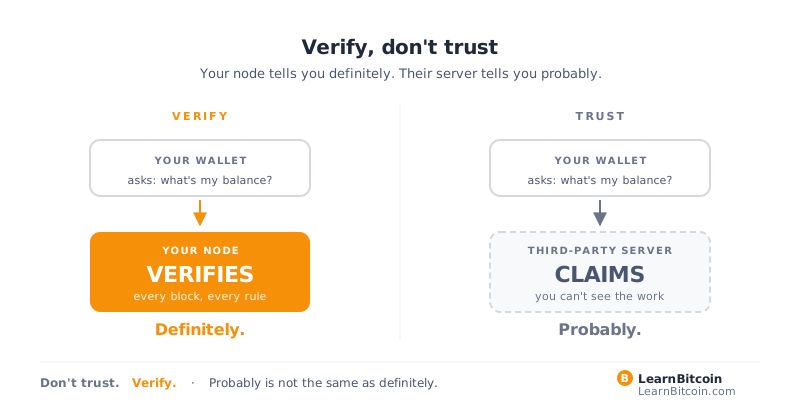
Privacy. When you use a public Electrum server (the default for most light wallets), that server sees every address in your wallet, every balance, every transaction you query. Running your own node means none of that leaks to anyone.
Censorship resistance. A wallet relying on a service can be cut off from that service. A wallet talking to your own node cannot be - your node is yours.
Supporting the network. Each additional full node strengthens the network's decentralization. There are tens of thousands of nodes globally; adding one is a meaningful contribution. (Not a financial one - running a node doesn't earn you anything. The reward is the system itself.)
Fee data, mempool data, address data on demand. With your own node, you have direct access to everything the network knows. Want to monitor an address? Query your node. Want to know the current fee market? Query your node. Want a custom data feed? Query your node.
A full node uses a few hundred MB of RAM and disk space equal to the full blockchain - about 700 GB as of 2026, growing by roughly 50 GB per year. It runs on any modern hardware. Once it's running, you can mostly forget about it for months at a time.
3. The Hardware and OS Options
Don't overthink this. Get something running. Improve it later.
Three reasonable starting points for the hardware:
- Raspberry Pi 5 with a 1 TB SSD. ~$200 total. Low power, fits anywhere, runs 24/7. The classic Bitcoin node hardware.
- A refurbished mini PC (Intel NUC class or equivalent). ~$150-300 used. More headroom than the Pi if you might add Lightning or other self-hosted services later.
- A repurposed laptop or desktop you already own. Free, if the hardware is reasonable. Best for someone comfortable with software setup who doesn't want to buy anything new.
Three reasonable starting points for the node software:
- Umbrel. Easy on-ramp. Big app store on top of Bitcoin Core. Web UI. Best if you want one-click apps and a polished experience.
- Start9 (StartOS). Sovereignty-focused. Web UI. Tighter defaults on privacy and Tor.
- Bitcoin Core directly. Skip the wrapper. Edit
bitcoin.confyourself. Best if you're comfortable with a shell and want zero abstraction.
Starting points, not gospel. These work. Others exist. The self-hosting ecosystem moves. Pick something that fits and start - don't try to optimize before you have anything running.
4. The Setup Walkthrough
Don't try to perfect this on the first pass. Just get something running. Improve it later.
- Pick your hardware. Pi 5 + SSD if buying fresh. Spare laptop if you have one.
- Pick your OS. Start9 or Umbrel for the pre-built path. Bitcoin Core directly if you're comfortable with shell.
- Flash the OS to the SSD or boot drive. The node OS providers give clear flash instructions. (Mac: balenaEtcher. Windows: Rufus. Linux:
dd.) - Boot the node and connect to it via web interface (Umbrel/Start9 give you a
.localURL on your home network). - Wait for sync. The initial download is the painful part - several hundred GB to fetch and validate. On a Pi with a decent SSD, this takes a day or two. Don't worry about it; just leave it running.
- While it syncs, read the docs. Set up Tor (it's usually a checkbox in the node OS). Decide if you want Lightning (yes, eventually).
- Once synced, test it. Run a query: get the latest block height. Get a transaction by ID. Verify a balance.
You now have a Bitcoin node. Welcome.
5. Pointing Your Wallet at Your Node
A node is only useful if your wallet talks to it instead of a third-party server. Every modern wallet supports this; it is a one-time configuration.
Three reasonable starting points for a desktop wallet that pairs cleanly with your own node:
- Sparrow Wallet. Cleanest UI for own-node pairing. Settings -> Server -> "Use Bitcoin Core" or "Connect to Electrum server." Sparrow becomes a thin client over your node.
- Specter Desktop. Talks directly to your Bitcoin Core via RPC. Multisig-friendly. Slightly more advanced setup.
- Electrum. The veteran light client. Long track record. Point it at the Electrum endpoint your node OS exposes.
The pattern is the same in each case: a one-time server setting that tells the wallet to ask your node instead of a stranger's.
To verify it's working: shut down your home internet connection or DNS, and confirm your wallet can still see your node and your balance over the LAN. If yes, you are not depending on anything external.
6. Multisig 101
A single seed phrase is a single point of failure. Lose it, all coins gone. Compromised, all coins gone. For larger amounts, single-sig isn't enough.
Multisig (multi-signature) requires multiple keys to authorize a spend. The most common setup is 2-of-3: three keys exist, any two can spend, no single key can.
Why this matters:
- Lose one key - coins are still safe and recoverable (any 2 of the remaining 2)
- One key is compromised - coins are still safe (attacker needs another key)
- A bad actor gets your house - they might find one key, not all three
- Inheritance becomes manageable - heirs need help from multiple parties, not just a recovered hard drive
Multisig isn't just for paranoid whales. The right setup for $20,000 of bitcoin is roughly the same as for $200,000. If you have any meaningful balance, 2-of-3 is reasonable.
7. Multisig in Practice
A 2-of-3 multisig requires three things.
Three hardware wallets, from three different manufacturers. Vendor diversity is the rule, not specific brands. Three reasonable starting points: Jade, Foundation Passport, Trezor. Others exist; pick three from brands you trust and can verify. A hardware vulnerability in one model should not compromise more than one of your keys. The July 2026 Coldcard entropy incident is the case study: seeds generated on affected firmware were guessable, wallets were drained, and a multisig with only one affected key would have held. If any of your keys came from a Coldcard, rotate that seed on a different device.
Three seed phrases, each generated on its own hardware wallet, each backed up independently on metal in physically separate locations.
A coordinator - software that knows the public keys for all three and constructs transactions that any two can sign. The coordinator does not hold your keys. It just knows what they are publicly and orchestrates signing.
Three reasonable starting points for the coordinator: Sparrow Wallet, Specter Desktop, Electrum. All three handle 2-of-3 wallet creation, PSBT generation, and combining signatures from your hardware wallets.
The flow:
- Generate three hardware wallets, each with its own seed. Back up each seed on steel, in three different locations.
- Export each wallet's public key (the xpub or descriptor) and import it into the coordinator.
- The coordinator generates multisig addresses from all three xpubs. Receive bitcoin to these.
- To spend: the coordinator builds a transaction, you sign it with any two of your three hardware wallets (in sequence), the coordinator combines the signatures, broadcasts.
The first time you do this it takes a couple of hours. After that, spending feels almost normal, just with an extra signing step.
Distribute the keys carefully. A common arrangement: one at home, one at a relative or trusted friend's, one in a bank safe-deposit box (or another distant location). The point is no single physical event (house fire, burglary, natural disaster) takes out more than one key.
8. Privacy and Op-Sec
Bitcoin is pseudonymous, not anonymous. Every on-chain transaction is public forever. Anyone with the time and the chain analysis tools can correlate addresses to identities. Your privacy is your responsibility.
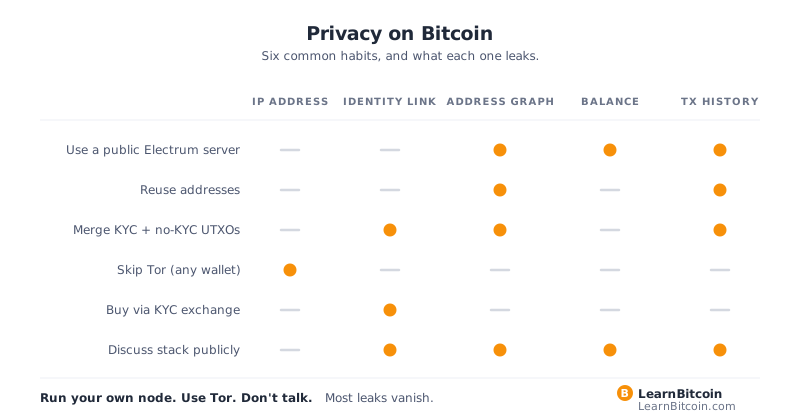
The basics, in order of effort:
1. Never reuse addresses. Every receipt should be to a fresh address. Modern wallets do this by default. Don't override.
2. Use coin control. Most wallets let you select which UTXOs to spend in a given transaction. Don't merge UTXOs that come from different sources unless you've thought about it. Mixing UTXOs in one transaction links those sources publicly.
3. Run your wallet over Tor. The internet sees IP addresses tied to transactions even when the blockchain doesn't. Tor breaks that. Most node OSes have a Tor toggle.
4. Avoid KYC for everything if you can. Buying bitcoin without ID is meaningfully harder than buying with ID, but the privacy benefit is real. Peer-to-peer markets (Bisq, RoboSats, AgoraDesk) work. Bitcoin ATMs work in some places. Earning bitcoin (freelancing for it, etc.) works.
5. Don't talk about your stack publicly. Not your address, not your balance, not your hardware setup. Anonymity in social spaces is its own form of self-defense. (Use pseudonymous accounts where useful.)
6. Sweep KYC and no-KYC coins separately. If half your coins are from a regulated exchange (KYC) and half from peer-to-peer (no KYC), keeping them in different wallets prevents accidentally linking your KYC identity to your private holdings.
7. Consider CoinJoin. A privacy-enhancing technique where multiple users pool transactions to obscure which inputs map to which outputs. The landscape changed in 2024, when US prosecutors arrested the operators of one coordinator and the other major coordinator shut itself down; the decentralized designs survived. Read Privacy on Bitcoin before using any of them.
We've put together a Privacy Best Practices PDF and a Privacy Checklist - both downloadable from this site. Read them before scaling up.
9. Inheritance Planning
The hardest part of self-custody is something the marketing doesn't talk about: what happens when you die.
If you die with self-custodied bitcoin and no inheritance plan, your coins are likely lost forever. Your heirs may know you held bitcoin. They will not know your seed. They will not know your passphrase. They will not know which hardware wallet to look for. The bitcoin is on the chain, but unreachable.
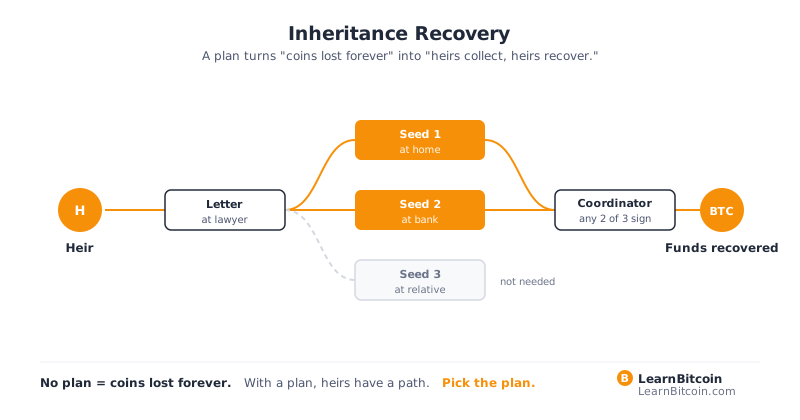
A reasonable inheritance plan:
- Document everything. A sealed letter with: where the seed backups live, what wallet software to install, what to expect (number of UTXOs, approximate balance, approximate addresses), and step-by-step instructions for restoration. Update it annually.
- Don't put the seed itself in the letter. Put instructions for finding the seed. The seed is in the safe / metal plate / safe-deposit box; the letter is in your filing cabinet.
- Distribute the right way. A trusted family member knows the letter exists. A lawyer or executor knows where to find the letter. Whoever inherits has clear written guidance.
- For multisig, the plan needs to walk through coordinating multiple keys. Distribute the coordinator wallet descriptor separately from any single seed. Anyone with a single seed gets nothing on their own; the system needs the heirs to assemble multiple pieces.
- Practice the recovery. Have your heirs (or executor) attempt the restoration while you're alive, on testnet or with a tiny amount. The first time anyone follows your instructions should not be after you die.
Bitcoin inheritance is genuinely solvable. Most people don't solve it because most people don't plan. Be the exception.
10. The Threat Model
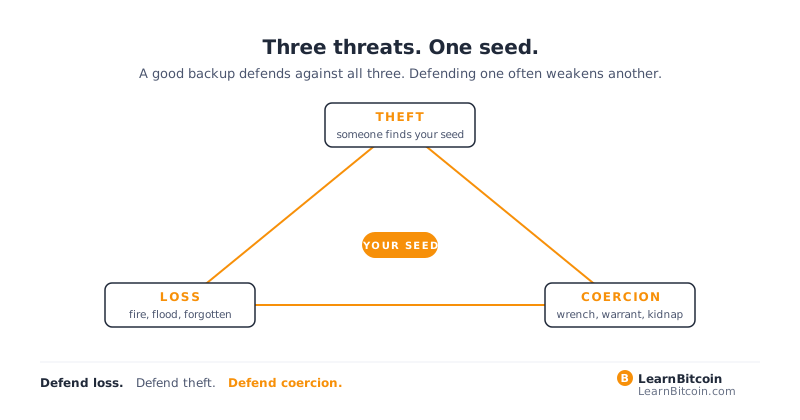
A note on paranoia: not all threats are equal, and treating them as such wastes your time.
For most people holding modest amounts:
- Most likely failure: losing the seed (single backup, fire, forgetfulness)
- Second most likely: phishing (fake support, fake wallet update, fake site)
- Third most likely: exchange failure (if you haven't withdrawn to self-custody)
- Fourth most likely: physical theft (someone learns you hold and breaks in)
For most people, the multi-location-steel-backup + hardware wallet + don't-talk-about-it pattern is enough. You don't need a Faraday cage. You don't need a $10,000 HSM. You don't need to run your own ISP. You need to not be the easy target.
For larger amounts: tighten op-sec proportionally. Geographic distribution matters more. Multisig matters more. Talking about your holdings matters even less.
This is not a competitive sport. The point of sovereignty is calm, not anxiety.
11. Graduation
You're done with the first part of the journey.
You understand why money is broken. You know what Bitcoin actually is. You know how it works under the hood. You self-custody. You use both layers. You run your own node. You have multisig. You have a plan for what happens after you.
You don't need permission. You don't need a custodian. You don't need to ask anyone whether your money is safe - you can verify it yourself, end to end, at any moment.
That's the deal Bitcoin offered in October 2008. It took six chapters and however many hours of your time, but you got it.
There is more, of course. Lightning routing nodes. Liquid sidechains. Watchtowers. Coinjoin. Discreet log contracts. PSBTs across air-gapped multisig. Sovereign computing more broadly. Network privacy at the application layer. We've started a section called Rabbit Holes for those, each one a self-contained explorer on a single topic. Pick one when you feel like it. None of them is required to use Bitcoin well.
Your journey has begun. The rabbit holes go deeper.
Pro tip: Sovereignty is not a destination, it's a posture. The work you did over these six chapters isn't a finish line - it's a foundation. The next ten years of your relationship with Bitcoin will be richer than the first six chapters because you put in the foundation now. Have fun. Stay humble. Run a node.