
ExploreRabbit Hole · Custody and Privacy · Intermediate · 17 min
Run Your Own Node
What a node of your own checks and what it does not, what it costs in disk, time and bandwidth in November 2026, how to set one up, and how to make your wallet ask it.
Where you're going: A node of your own, often called a full node, is a computer at home that keeps its own copy of Bitcoin's record and checks every block, with your wallet set to ask it and not a stranger's server. This page says what that changes and what it does not, what it costs, and how to set one up. You need a computer that can stay on for the first download; about a terabyte of free disk, or about 16 GB with pruning (the node deletes old blocks once it has checked them); an internet connection without a tight data cap; and an afternoon of your time. The first download then runs by itself for hours or days.
Do you need one?
No. You can hold and spend bitcoin without one, and the Journey's last chapter lists a node under "Later, if ever". Sparrow, a desktop wallet whose makers publish advice on storing bitcoin, says that up to about US$10,000 "it's not necessary to run your own Bitcoin Core node". Bitcoin Core is the most popular program for running a node.
Which of these is you?
- A wallet app on your phone. Look in its settings for a place to enter your own server, and enter nobody else's. If there is none, a node will not change what that app tells anyone, and "Point your wallet at it" says what moving to another wallet takes.
- A hardware wallet, used with a program on your computer. Look in that program's settings in the same way. Two programs named below work with such devices.
- You only want to learn. Bitcoin Core on a computer you already own, with pruning on, takes about 16 GB of disk and one long download, and changes nothing for your coins.
What your wallet does without one
A wallet has to ask some computer which payments have reached your addresses. Unless you set it otherwise, that computer belongs to someone else.
That computer learns which addresses are yours. The documentation of Electrum, a wallet that works this way, says its server "can now reasonably guess that all these addresses belong to the same entity", and that every server the wallet connects to sees your IP address, the number that identifies your internet connection.
It can also hide a payment from you. Electrum does check that each confirmed payment is in a block, by the method in section 8 of Bitcoin's founding paper, a way to check that without downloading every block. About payments not yet in a block, the server is simply trusted.
What a node of your own changes
It checks the rules itself. Your node downloads every block and tests it against the rules in the program you run: a block may create only so many new coins, no coin may be spent twice, every payment needs a valid signature. A block that breaks a rule is rejected, in the Bitcoin Wiki's words, "even if every other node on the network thinks that it is valid". Miners with most of the mining power cannot make your node accept one.
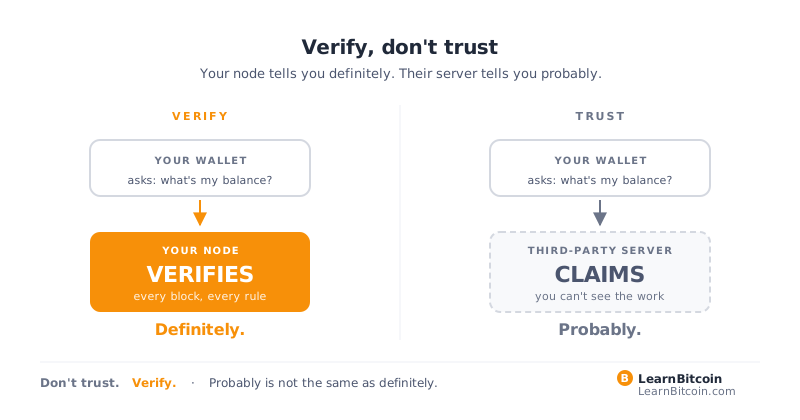
Your wallet's questions stay at home. When the wallet asks your own node about your addresses, no outside server sees the list.
What it does not do
- It takes one shortcut by default. Bitcoin Core may skip one check on old blocks, up to a block fixed in each release: in version 32.1, block 966,143, from early September 2026. What it skips is running each old payment's spending conditions, which is where signatures are checked. Every other check is still made, and later blocks are checked in full. Step 5 switches the shortcut off.
- It relies on its software. You trust the people who write the program and, if you use a ready-made system that sets the node up for you (a node package; two are named below), the company that assembled it. Bitcoin Core's download page calls checking the file "optional but highly recommended"; step 1 treats it as required.
- It sees only what other nodes show it. A node cut off from honest ones can be shown a false picture. Bitcoin Core's notes say the system "works best if you are connected to a handful of nodes".
- A payment not yet in a block is not settled, whoever reports it. The founding paper's advice holds: wait until it "has been added to a block", and for more blocks after that.
- It does not hide everything. If your wallet connects straight to Bitcoin Core, Sparrow's guide warns, "Bitcoin Core stores your public keys and balance unencrypted on the computer it is running on". And your home's IP address is visible to the nodes yours connects to, unless it reaches them through Tor (below).
- It guards no keys. A node never needs your seed words. It does nothing about a lost backup, or a stranger who persuades you to send coins. The Journey's six rules still do that work.
- It pays nothing. Bitcoin pays the miner who makes a block, and nobody for checking one, so anyone selling a node that earns is selling something else. A node protects its owner: "the only node that matters is the one you use", says a Bitcoin Wiki article of 2016. How much one more helps the network is argued over, and the case for running one does not rest on it. One public counter found about 19,000 addresses at which nodes accept connections in mid-November 2026, counting a node once for each network it listens on. Decentralization has the wider argument.
What it costs
The figures are for November 16, 2026.
Disk. The blocks alone came to about 783 GB, 83 GB more than a year before. A node stores more than the blocks, and Bitcoin Core 32.1, the current release, says on its set-up screen: "At least 911 GB of data will be stored in this directory, and it will grow over time." Treat that as a floor: it dates from September 2026, and the blocks alone grow by about 7 GB a month. A 1 TB drive is too tight, and a 2 TB drive leaves room for years. With less disk, the node can prune (step 4).
The first download. The node fetches the whole record and checks it as it goes, so the disk and the processor matter as much as the connection. The set-up screen calls it "very demanding", and one maker of node packages says it "takes anywhere from several hours to a few days depending on your hardware, disk, and network".
Bandwidth. After that, Bitcoin Core's download page counts "a further 5-10GB per month" coming in. Going out varies: a node that others can reach also sends old blocks to new nodes, a "major component of the traffic" in the project's words, and a setting holds the upload near a daily target, which is not a hard limit.
Your router. By default Bitcoin Core asks your router to let other nodes connect to yours, which works only if the router supports it. The box is "Map port using PCP or NAT-PMP", on the Network tab of the Options window (natpmp=0 in the settings file turns it off). It opens the port nodes use to pass blocks and payments to each other, not RPC, the control channel described below. A node that others can reach is listed, with your home's IP address, on public counters such as the one above. You never need to open a port by hand.
Memory. By default Bitcoin Core 32.1 lets its two largest working stores (caches) grow to about 1.4 GB together, or about 0.8 GB when the system reports less than 4 GB of memory, as a computer sold as 4 GB does.
A computer that is on. Bitcoin Core need not run all the time: "Each time you run" it, the set-up screen says, "it will continue downloading where it left off." But your wallet can ask it only while it is running and caught up.
Choose the computer and the software
Do not try to get this perfect on the first pass. The node holds none of your seed words, so a poor choice costs time and not coins, as long as the software comes from its maker (step 1) and follows the same record as the people who pay you.
Every product named from here on is an example, checked at its maker's own pages on November 16, 2026, and not ranked. Nobody paid to be named here.
The computer
- One you already own. A desktop or laptop with enough free disk is the cheapest start. Bitcoin Core 32.1 runs on Windows 10, macOS 14 and Linux, or newer.
- A mini PC, or a small board such as a Raspberry Pi 5, with a 2 TB solid-state drive (SSD). Both node packages below run on ordinary Intel and AMD machines. Check which board your software supports before you buy.
The software
- Bitcoin Core by itself, from bitcoincore.org. It has an ordinary window with menus, and suits a node on a computer you also use.
- umbrelOS, from Umbrel (umbrel.com). A home-server system with an app store, run from a web page. Bitcoin Core runs as its Bitcoin Node app, with a setting for connecting over Tor. Its install guide covers the Raspberry Pi 5 and Pi 4 and recommends the 5.
- StartOS, from Start9 (start9.com). Also a server system run from a web page. It installs on desktops, laptops and mini PCs; among Raspberry Pi models it supports the Pi 4 only. Tor is added as a service from its marketplace.
Options, not gospel. Others exist, and this corner of software moves fast. Check the maker's own pages again before you rely on a name here.
A node enforces the rules of the program it runs, so one choice inside a package matters: it may also offer Bitcoin Knots. From May 2026 Knots has shipped a rule change, BIP 110, that Bitcoin Core does not. On August 8, 2026, the first block that had to signal support for it did not, and nodes enforcing the rule rejected that block and all that followed. The note that closed the proposal says it "split to a new chain and stalled"; Knots' own notes say "most former miners abandoned Bitcoin en masse". Knots' releases from September 2026 on use a different proof of work, so a node running them cannot check any payment made since August 8 on the record Bitcoin Core follows. This page uses Bitcoin Core. An offer to "claim" coins on the other record that asks for seed words is a theft.
Set it up
- Get the software from its maker's own site, and check it. Type the maker's address yourself; each is printed on this page. Never start from a search result, an advertisement, a link in a message or a stranger, and do not look for it in an app store. Check the file before you open it. Bitcoin Core's download page, under "Verify your download", gives the steps for Windows, Mac and Linux: two small files to download, a command that works out your file's checksum to match against the published list, and a program called GPG, which you may need to install, to check who signed that list. This, it says, "ensures that you have not downloaded an unexpected or tampered version". Start9's guide has its own steps; Umbrel's download page shows a checksum beside each file, shortened, with a button that copies it in full, and gives no steps for checking it. If you cannot do the check, stop, and ask someone you know in person. Nobody from the project will offer to help: its contact page says "Bitcoin Core does not provide technical support". Do not skip it.
- Install it. Bitcoin Core installs like any program. A node package takes over the whole machine and erases the card, stick or drive it is written to, so use nothing that holds files you need, and follow its maker's install guide step by step.
- Open it. Bitcoin Core opens a window. A node package is usually run without a screen of its own: from another computer on your home network, open
http://umbrel.localorhttp://start.localin a browser and create a login. Type those addresses yourself and never follow a link to them: they work only inside your home. Do not type seed words into it. Seed words go only into your own wallet, on its own screen, when you set it up or bring it back yourself, and never into a web page. A node's page or program never needs them. - Choose where the data goes, and whether to prune. Bitcoin Core's first screen asks both: the folder, under "Use a custom data directory", and pruning, with the box "Limit block chain storage to". It ticks the pruning box for you when less than 921 GB is free; tick it yourself unless the node has a drive of 2 TB or more to itself. A pruning node still downloads and checks every block, and is still a full node. The price: it cannot hand old blocks to new nodes, cannot search old blocks for a wallet you connect later, and cannot feed electrs, the Electrum server of the next section (StartOS says its package works round this). Pruning cannot be undone without downloading everything again. A node package handles this in its own settings.
- Wait for the first download. To have the old signatures checked too, add a line to Bitcoin Core's settings file,
bitcoin.conf, as soon as the main window opens. Choose Settings, then Options (on a Mac, the entry is in the program's own menu, beside the Apple menu, as Preferences or Settings), press "Open Configuration File" at the bottom left, then Continue. The file opens, empty the first time; if you are asked which program to open it with, choose a plain text editor. If it says the file could not be opened, findbitcoin.confin the folder you chose in step 4 and open it with one. Typeassumevalid=0on a line of its own, exactly as printed, and save. Close the Options window, then quit Bitcoin Core (File, then Exit; on a Mac, Quit in the program's own menu, since closing the window there leaves it running). When it has finished shutting down, open it again: it reads the file only when it starts, and blocks already processed are not checked again. Expect a slower download. Add no line that anyone else gives you: a line in this file can make Bitcoin Core run a program. Do not make this file before the first start, or Bitcoin Core will skip its first screen. A node package may fix this setting for you; StartOS does. - Check it. When the download is done (the bar at the bottom of the window that says how far behind the node is has gone), look in Bitcoin Core under Window, then Information, for the line "Current block height"; the command
getblockcount, typed under Window, then Console, returns the same number. The console opens with a red warning that scammers tell people to type commands there: this command only reads a number, and none that somebody gives you belongs there. It should match the height on this site's node page, which comes from a different node, give or take the newest block.
You now have a Bitcoin node.
Point your wallet at it
A node changes nothing until your wallet asks it. That is one setting, made once, and not every wallet has it.
Straight to Bitcoin Core. The wallet uses Bitcoin Core's control channel, called RPC, through which other programs give it commands. In the windowed program RPC is off until you tick "Enable RPC server" in the Options window and restart. Even then it answers only programs on the same computer. Leave it so: "Do not enable RPC connections over the public Internet", Bitcoin Core's notes say, and nobody else ever needs your node's login or address. It is the simple route when wallet and node share a computer, and it has the leak described above.
Through an Electrum server. This program sits beside the node and indexes the whole record, so it can answer any wallet at once without noting which addresses are yours. One such program, electrs, needs the full record, not a pruned one, and an index about a tenth of its size. On umbrelOS it is an app, Electrs, installed after the Bitcoin Node app.
Two desktop wallets that have the setting (get each as in step 1):
- Sparrow (sparrowwallet.com). In Settings, on the Server tab, choose a Bitcoin Core node or a private Electrum server, enter your node's details and press Test Connection. With RPC switched on and Bitcoin Core on the same computer, its guide says "you should be ready to go": Sparrow signs in with "the cookie file that Bitcoin Core writes to the data folder", so there is nothing to type; if you chose your own data folder in step 4, select it there. A pruned node, it says, is fine for a new wallet.
- Specter Desktop (github.com/cryptoadvance/specter-desktop). It talks straight to Bitcoin Core and is built around hardware wallets and multisig, wallets that need more than one key (Multisig and Inheritance). Its makers add: "This software might be ready to be used but at your own risk." Check on its releases page that the newest release has a build for your system.
Making the setting never needs your seed words. If your keys are on a hardware wallet, you may not need a new wallet at all: Sparrow and Specter Desktop both work with the device itself, and your words stay on paper (see the wallets page). If your wallet is an app with no such setting, do not type its seed words into a second program to get one. Take the route the Journey taught: make a new wallet in the program you have chosen, with new words on paper; test that backup before any coins go in; then pay the new wallet from the old one, a small amount first, checking the whole address each time. Keep the old wallet and its paper afterwards too: a payment to an old address can be spent only with them. The new keys will live on that computer. And a wallet whose words anyone else made, sent or saw is not yours: never move coins to an address someone gives you for set-up.
Check that it worked. Read the wallet's server setting: it should show your own node's address and no other. For Bitcoin Core on the same computer that is 127.0.0.1 (localhost); a node package shows its address on its own page. Never enter a server address that somebody gives you. For a stricter test, with the wallet on a computer on your home network, unplug your router's cable to the internet, not its power, so that the home network keeps running: a wallet that still connects (in Sparrow, Test Connection still succeeds) is talking to something in your home. A phone on mobile data would pass falsely. The test shows that the wallet can reach your node, not that it reaches nothing else. If the wallet reaches the node through Tor, the test fails even when all is well, because Tor needs the internet: check instead that the setting holds your node's own address ending in .onion.
Should it use Tor?
Tor is a program that hides where a connection comes from, in the Tor Project's words "by bouncing your communications around a distributed network of relays run by volunteers". A node that makes all its connections through Tor does not show your home's IP address to the nodes it connects to. On umbrelOS that is a setting in the Bitcoin Node app; on StartOS you install Tor as a service first, then choose Tor alone under the Bitcoin service's Peer Settings.
A wallet and a node in the same home do not need it, because that traffic never leaves your network. Privacy on Bitcoin covers the other leaks.
Keep it running
A node is not a thing you set up and forget.
- Update it. The Bitcoin Core project recommends "running the latest maintenance release of the most recent major version you are able to upgrade to". On October 27 and 28, 2026, it released fixes for, among others, a flaw that let another node crash any Windows, macOS or BSD node it was connected to. A node package passes such releases on as updates: Umbrel's came on October 30. The project lists releases on its own site; its announcements page says "The announcements list is currently not available" and offers a feed. An email, a message or a pop-up on a web page telling you to update is not how updates arrive. For Bitcoin Core, go to its site yourself, as in step 1; a node package shows its updates on its own page, which you open yourself as in step 3. No update asks for seed words.
- Expect the drive to fail one day. If you kept no wallet on the node itself, that is a nuisance and not a loss: the record is public, and the node can download it again. Your coins were never on the node. They are wherever your keys are.
What this buys us
A node buys two things. Your wallet's questions stay inside your home. And the answers come from a program on your own machine that has tested the blocks against the rules, so you are no longer taking a company's word for them.
It does not make you an island. You still rely on the people who write the software, on your internet provider, on the other nodes yours talks to, and on miners to put your payments in blocks.
If that is worth a spare computer, a large disk and some upkeep, set one up. If not, you have lost nothing by knowing what one does.
More in Custody and Privacy
Sources
- Bitcoin Core - Download (latest version 32.1 on November 16, 2026; after the first download, 'a further 5-10GB per month'; its section 'Verify your download' calls the check 'optional but highly recommended', gives, for Windows, macOS and Linux, commands to type that work out the file's checksum, to be matched against a published list, and that use GPG to check the signatures on that list, and says this 'ensures that you have not downloaded an unexpected or tampered version'; its 'about 600GB' for the first download is out of date)
- Bitcoin Core 32.1 release notes (October 27, 2026): versions 29.x and older are at end of life and will no longer receive updates; runs on Windows 10, macOS 14 and Linux, or newer; it sends readers to the project's announcements page
- Bitcoin Core - Software Life Cycle (32.x released October 27, 2026, and 29.x end of life the same day; 'We recommend running the latest maintenance release of the most recent major version you are able to upgrade to')
- Bitcoin Core - advisory CVE-2026-117350 (October 28, 2026): a malicious peer could crash any Windows, macOS or BSD node it was connected to; fixed in 32.1, 31.2, 30.4 and 29.5, which the project released on October 27 and 28, 2026
- Bitcoin Core 32.1 - chainparams.cpp (mainnet disk guidelines 897 and 14, which the setup screen adds up to 911 GB; default assumevalid block 966,143)
- bitcoin/bitcoin pull request 36196 (merged September 11, 2026) - the update before release 32 that set the mainnet disk guideline to 897, from 856, and the assumevalid block to 966,143
- Bitcoin Core 32.1 - intro.cpp (the setup screen says at least 911 GB of data will be stored, or approximately 16 GB with pruning at the default 2 GB target; the pruning box is ticked by default when less than 921 GB is free; the first screen is shown only when the data folder does not yet exist)
- Bitcoin Core 32.1 - intro.ui, the setup screen's text (the initial synchronisation 'is very demanding'; 'Each time you run' the program 'it will continue downloading where it left off'; a pruned node still downloads and processes the history; reverting pruning 'requires re-downloading the entire blockchain'; the two choices are labeled 'Use a custom data directory:' and 'Limit block chain storage to')
- Bitcoin Core 32.1 - guiconstants.h (default prune target shown in the setup screen: 2 GB; the screen counts a GB as 1,000,000,000 bytes)
- Bitcoin Core 32.1 - release-process.md (the disk guideline is a synced node's real size, taken in GiB, plus an overhead of 5-10%; it is one of the figures brought up to date when a release is prepared)
- Bitcoin Core 32.1 - init.cpp, help text for -assumevalid ('potentially skip their script verification', 0 to verify all), -prune, -maxuploadtarget ('Tries to keep outbound traffic under the given target per 24h'), -listen, -natpmp ('Use PCP or NAT-PMP to map the listening port', on by default) and -startupnotify ('Execute command on startup.')
- Bitcoin Core 32.1 - validation.cpp (script checks are skipped only for blocks under the assumed-valid block; the other checks still run; with assumevalid=0 every script is checked; the choice is made as each block is connected, so blocks already processed are not gone over again)
- mempool.space API - block 966,143 (timestamp September 9, 2026, 03:46 UTC)
- Bitcoin Core 32.1 - reduce-memory.md (default -dbcache 1024 MiB, or 450 MiB if less than 4096 MiB of RAM is detected; -maxmempool 300 MB; 'A lower -dbcache makes initial sync time much longer')
- Bitcoin Core 32.1 - caches.cpp (the 1024 MiB cache needs at least 4096 MiB of RAM as reported by the operating system)
- Linux kernel docs - /proc/meminfo (MemTotal is physical RAM minus reserved memory and the kernel's own code)
- Bitcoin Core 32.1 - reduce-traffic.md (serving historic blocks to new nodes is 'A major component of the traffic'; the -maxuploadtarget figure is a target and not a hard limit; the system 'works best if you are connected to a handful of nodes')
- Bitcoin Core 30.0 release notes (October 10, 2025): -natpmp is on by default, so a node behind a home router 'will be reachable' if the router supports PCP or NAT-PMP
- Bitcoin Core 32.1 - tor.md (running behind a Tor proxy 'will already anonymize all outgoing connections')
- Bitcoin Core 32.1 - JSON-RPC-interface.md (RPC lets other programs control Bitcoin Core; it is off by default in the windowed program; by default it answers only clients on the same computer; 'Do not enable RPC connections over the public Internet'; commands can be typed in the window's console)
- Bitcoin Core 32.1 - optionsdialog.ui (the Options window: the box 'Enable RPC server'; on the Network tab, the boxes 'Map port using PCP or NAT-PMP' and 'Allow incoming connections'; at the bottom left, the button 'Open Configuration File')
- Bitcoin Core 32.1 - optionsmodel.cpp (the 'Enable RPC server' box sets the same server setting as the line server=1, is off by default, and needs a restart; the port-mapping box takes effect at once)
- Bitcoin Core 32.1 - optionsdialog.cpp (pressing 'Open Configuration File' first shows a notice with a Continue button; if the file cannot be opened the reader is told 'The configuration file could not be opened.')
- Bitcoin Core 32.1 - guiutil.cpp (the button creates bitcoin.conf if it does not exist, then opens it with the system's program for such files)
- Bitcoin Core 32.1 - bitcoingui.cpp (the menus: Settings holds Options, which is given the role that a Mac places in the program's own menu; Window lists Information and Console; File holds Exit; on a Mac, closing the window does not quit the program)
- Bitcoin Core 32.1 - debugwindow.ui (Node window, Information tab: 'Current block height')
- Bitcoin Core 32.1 - rpcconsole.cpp (the console opens with a warning: 'Scammers have been active, telling users to type commands here')
- Bitcoin Core 32.1 - blockchain.cpp (getblockcount returns the height of the most-work fully-validated chain)
- Bitcoin Core 32.1 - bitcoin-conf.md (changes to the settings file 'only take effect after restarting'; the file is kept in the data folder)
- blockchain.com chart data, raw - total size of the blockchain (783,343 MB on November 16, 2026; 700,178 MB on November 16, 2025)
- mempool.space API - block sizes for the past year (about 83.2 GB of blocks between heights 923,986 and 976,199, the year to November 16, 2026; the address returns a rolling year)
- Bitcoin Wiki - Full node (last edited August 12, 2026): Bitcoin Core is the most popular full-node software; a block that breaks a rule is rejected 'even if every other node on the network thinks that it is valid'; miners 'can only reorder or remove transactions'; a pruned or non-listening node is still a full node; an open port adds capacity; nobody else learns which addresses are yours
- Bitcoin Wiki - Clearing Up Misconceptions About Full Nodes (written March 2016): the heading 'Myth: The number of these nodes matters and/or is too low', said of nodes with open ports; 'the only node that matters is the one you use'; nobody knows exactly how many full nodes there are
- BTC Nodes API - addresses at which nodes accept connections (between 17,680 and 20,907 in the 100 hourly snapshots to November 17, 2026, 02:24 UTC, the evening of November 16 in the United States). The crawler's data begins May 8, 2026; it is a rebuild under a new operator and not the original Bitnodes service
- BTC Nodes API - snapshot of November 17, 2026, 02:24 UTC (20,907 'verified_endpoints', made up of 9,982 Tor, 4,728 I2P, 5,597 IPv4, 591 IPv6 and 9 CJDNS addresses; each entry is one address and port, so a node that listens on several networks is counted once for each)
- Satoshi Nakamoto - Bitcoin: A Peer-to-Peer Electronic Cash System, section 6 (a block's new coins go to its creator), section 8 (payments can be verified without running a full node) and section 11 (the recipient waits until the payment is in a block and more blocks follow)
- Electrum documentation, FAQ source - Does Electrum trust servers? (about 10 servers by default; the main server can guess that the addresses belong together; all connected servers see the client's IP address; confirmed transactions are verified via SPV; the server can lie by omission)
- Sparrow Wallet docs - Quick Start (public server, Bitcoin Core node, or private Electrum server; a wallet can be built on a connected or airgapped hardware wallet, or as a software wallet 'with the private keys in Sparrow'; verify the download)
- Sparrow Wallet docs - Connect to Bitcoin Core (Settings, Server tab, Test Connection; with Bitcoin Core on the same computer 'you should be ready to go', because Sparrow signs in with 'the cookie file that Bitcoin Core writes to the data folder'; the windowed Bitcoin Core first needs the line server=1; a pruned node is fine for a new wallet; Sparrow connects 'on localhost (127.0.0.1)', and a changed data folder has to be selected)
- Sparrow Wallet docs - Best Practices (up to US$10,000 'it's not necessary to run your own Bitcoin Core node'; running one contributes 'to the health and decentralization of the Bitcoin network'; Bitcoin Core 'stores your public keys and balance unencrypted on the computer it is running on'; an Electrum server keeps no record of your balance)
- Specter Desktop - README (a user interface around Bitcoin Core with a focus on multisignature setups with hardware wallets; 'This software might be ready to be used but at your own risk'; release 2.3.0 on November 14, 2026)
- electrs - README (an Electrum server indexes the entire blockchain so that a wallet need not ask outside servers; index storage overhead about 10%)
- electrs - configuration ('Pruning must be disabled for electrs to work')
- umbrelOS - repository page and README (a home server OS with 'over 300 apps in the Umbrel App Store' that installs directly onto a device; Intel and AMD machines, the Raspberry Pi 5 or a virtual machine)
- Umbrel - Installing umbrelOS on Raspberry Pi (updated October 22, 2026: runs on the Pi 5 and Pi 4, 'We recommend the Pi 5'; opened at http://umbrel.local)
- Umbrel - Installing umbrelOS on Intel and AMD devices (updated October 5, 2026: the USB drive it is written to 'will be erased', and on an internal drive 'Everything on that drive will be erased')
- Umbrel - Downloads (a SHA-256 checksum is shown beside each file, shortened to its first and last eight characters, with a button that copies it in full; the page gives no steps for checking it; an installed umbrelOS is updated from its own page: 'Open Settings on your Umbrel and check for updates')
- Umbrel App Store - Bitcoin Node, powered by Bitcoin Core (settings for Tor, clearnet and I2P connections; transacting through your own node 'helps keep the Bitcoin network decentralized'; version 1.5.0 of October 30, 2026, added the releases that fix the vulnerabilities disclosed on October 28)
- Umbrel apps repository - Electrs manifest (an Electrum server app that depends on the Bitcoin Node app)
- Start9 - StartOS repository README (an open-source Linux distribution for running a personal server)
- Start9 - Installing StartOS (desktops, laptops and mini PCs; among Raspberry Pi models, the Pi 4 only; its own steps under 'Verify your download'; the stick or card an image is written to is 'COMPLETELY ERASED'; opened at http://start.local)
- Start9 - Tor on StartOS (not included by default; installed as a service)
- Start9 - Updating StartOS ('StartOS notifies you' of an update and installs none by itself; updates are installed from the server's own page, under System, General)
- Start9 - Bitcoin Core on StartOS, instructions (the first download 'takes anywhere from several hours to a few days'; peers on the ordinary internet 'see your home IP'; block data is not backed up and re-syncs; assumevalid is fixed by the package; on disks under roughly 900 GB the node prunes automatically, and the package's RPC proxy lets an Electrum server work on a pruned node; Bitcoin Knots is offered as a second flavor; Peer Settings choose 'which networks to use')
- Tor Project - What is Tor? (a program that protects you 'by bouncing your communications around a distributed network of relays run by volunteers')
- Bitcoin Knots 29.3.knots20260508 release notes (published May 9, 2026, 01:18 UTC): 'This release includes the RDTS softfork', which is BIP 110, and 'asks for explicit confirmation' before applying it
- Bitcoin Knots 29.4.1.knots20260508 release notes (September 2, 2026): 'On August 8th, most former miners abandoned Bitcoin en masse'; the release makes 'a backward-incompatible protocol change' that includes a 'BLAKE2b proof-of-work algorithm'
- BIP 110 - Reduced Data Temporary Softfork (status Closed; from block 961,632 to block 963,647, 'blocks that do not signal bit 4 are rejected as invalid')
- mempool.space API - block 961,632 (timestamp August 8, 2026, 19:35 UTC; version 536895488, which is 0x20006000 and has bit 4 unset)
- Bitcoin Core 32.1 - bips.md (the proposals Bitcoin Core 32.1 implements; BIP 110 is not among them)
- bitcoin/bips pull request 2245 (merged August 10, 2026) - BIP 110 'was released on mainnet by Knots' and on August 8, 2026, began 'rejecting non-signaling blocks. It split to a new chain and stalled'
- Bitcoin Core - Subscribe to Bitcoin Core announcements (on November 16, 2026: 'The announcements list is currently not available'; the page offers an RSS feed and points to the project's blog)
- Bitcoin Core - Contact Us ('Bitcoin Core does not provide technical support')
Published . No corrections logged for this page.
Edit this page on GitHub